01
Document Assistant
A clean and modern mobile app that helps users scan, edit, convert, and manage digital documents with the help of an AI-powered assistant.
A clean and modern mobile app that helps users scan, edit, convert, and manage digital documents with the help of an AI-powered assistant.
A clean and modern mobile app that helps users scan, edit, convert, and manage digital documents with the help of an AI-powered assistant.
Role
Role
Role
UX/UI Designer
UX/UI Designer
UX/UI Designer
Timeline
Timeline
Timeline
6 weeks
6 weeks
6 weeks
Team
Team
Team
1 designer, 1 product manager, 1 developers
1 designer, 1 product manager, 1 developers
1 designer, 1 product manager, 1 developers
Overview
Overview
Hinto is a concept app built to reimagine mobile document workflows. From scanning physical papers to editing, converting, and chatting with an AI assistant, the app offers a seamless experience through a unified and minimal UI. I designed the core interface and additional screens to showcase a cohesive visual system, optimized for everyday productivity.
Hinto is a concept app built to reimagine mobile document workflows. From scanning physical papers to editing, converting, and chatting with an AI assistant, the app offers a seamless experience through a unified and minimal UI. I designed the core interface and additional screens to showcase a cohesive visual system, optimized for everyday productivity.
Hinto is a concept app built to reimagine mobile document workflows. From scanning physical papers to editing, converting, and chatting with an AI assistant, the app offers a seamless experience through a unified and minimal UI. I designed the core interface and additional screens to showcase a cohesive visual system, optimized for everyday productivity.
About the company
About the company
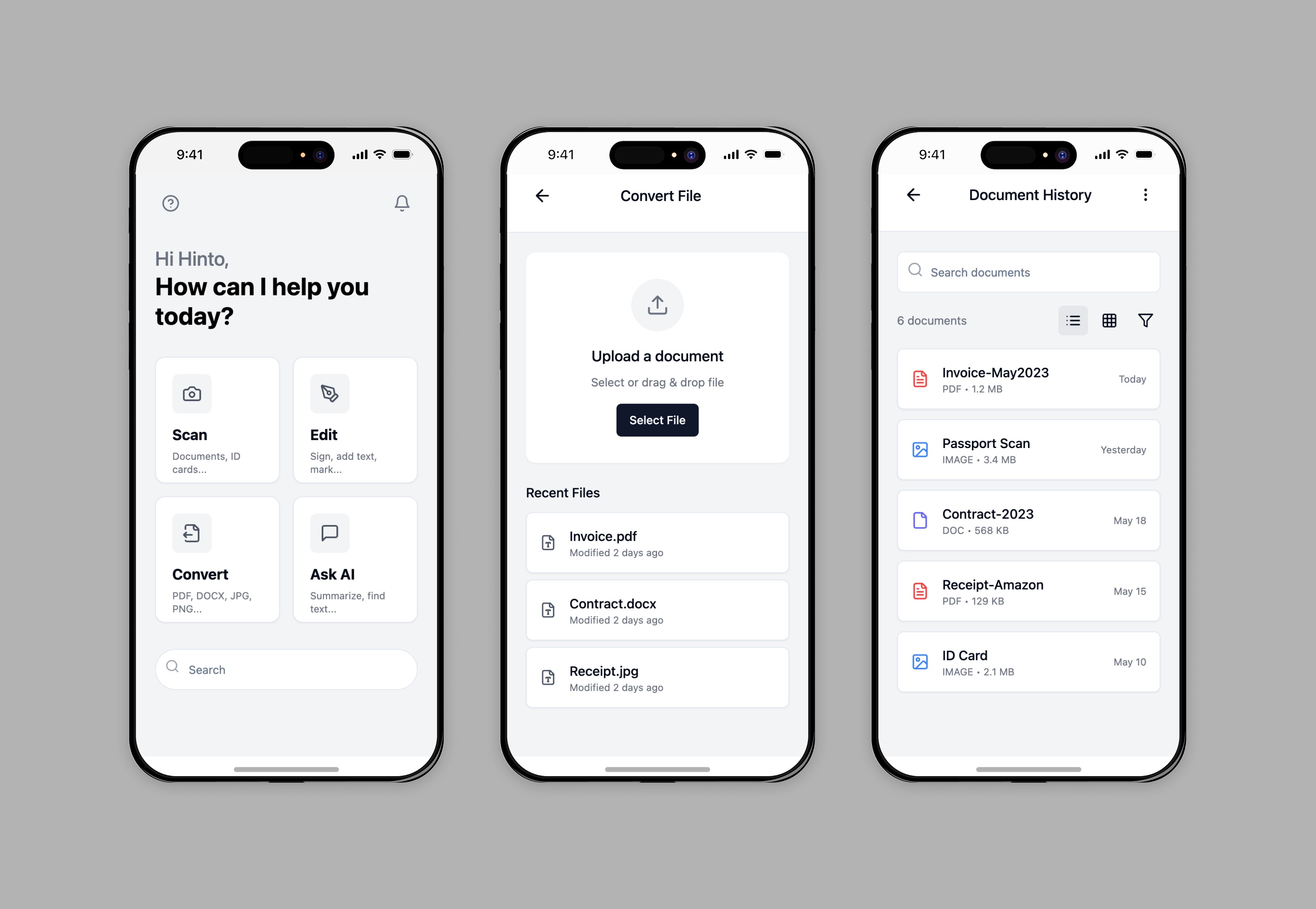
Hinto is a fictional productivity startup focused on streamlining digital document interactions. With an emphasis on mobile-first solutions, Hinto aims to make document-related tasks faster, smarter, and less frustrating for individuals and small teams.
Hinto is a fictional productivity startup focused on streamlining digital document interactions. With an emphasis on mobile-first solutions, Hinto aims to make document-related tasks faster, smarter, and less frustrating for individuals and small teams.
Hinto is a fictional productivity startup focused on streamlining digital document interactions. With an emphasis on mobile-first solutions, Hinto aims to make document-related tasks faster, smarter, and less frustrating for individuals and small teams.
Challenge
Challenge
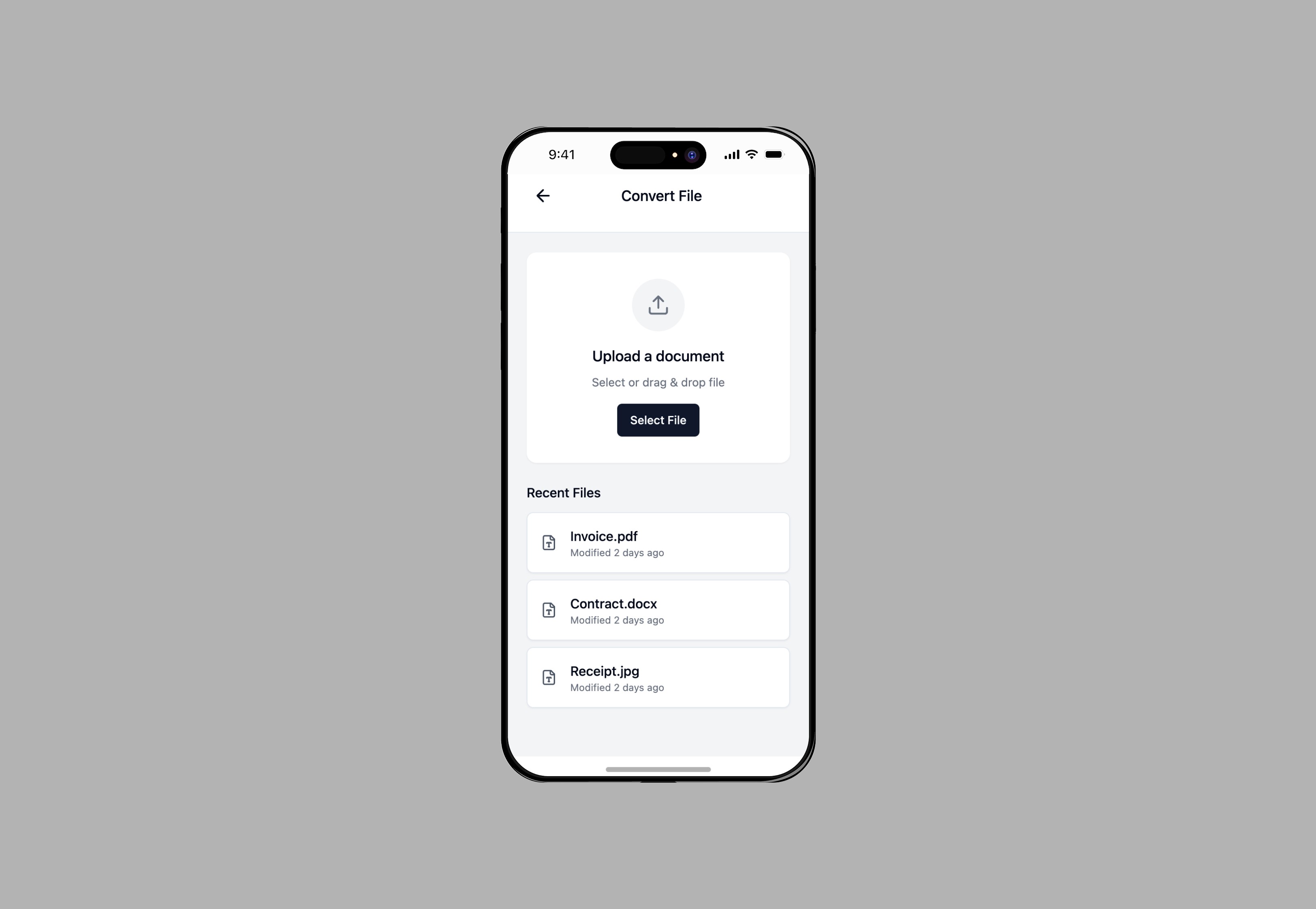
The challenge was to design a mobile experience that combines multiple complex document workflows—scanning, editing, converting, and AI chat—into one simple and intuitive app. Each flow had to feel light and approachable, without compromising functionality or clarity.
The challenge was to design a mobile experience that combines multiple complex document workflows—scanning, editing, converting, and AI chat—into one simple and intuitive app. Each flow had to feel light and approachable, without compromising functionality or clarity.
The challenge was to design a mobile experience that combines multiple complex document workflows—scanning, editing, converting, and AI chat—into one simple and intuitive app. Each flow had to feel light and approachable, without compromising functionality or clarity.
Redesign focus
Home Screen – Welcome & Navigation Hub
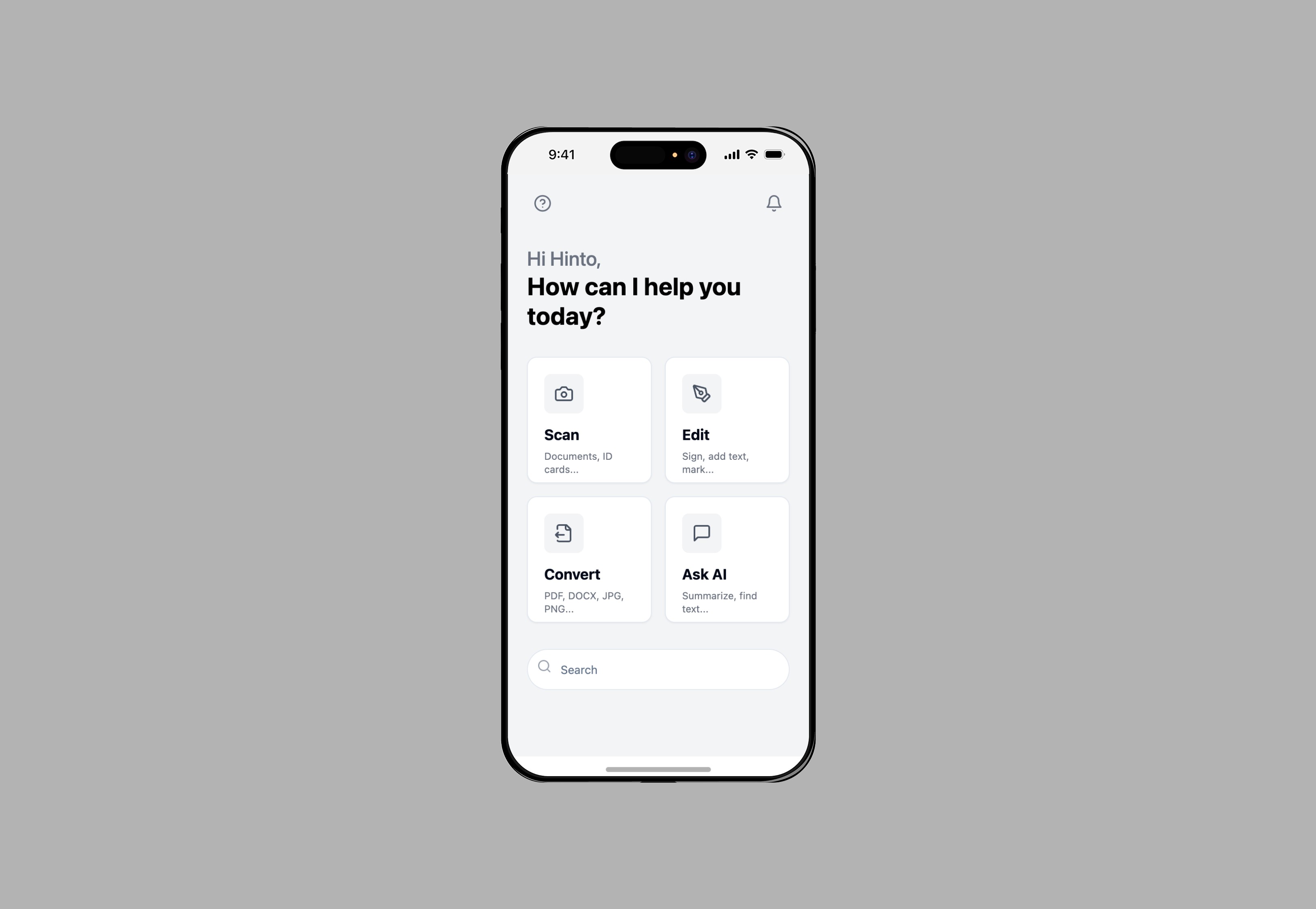
The home screen acts as the user’s starting point and greets them with a bold, friendly message: “Hi Hinto, how can I help you today?” Beneath the greeting, users see four main actions—Scan, Edit, Convert, and Ask AI—each represented by soft-rounded cards with monochrome icons and micro-descriptions. This hub sets the tone: intuitive, warm, and highly focused.
The home screen acts as the user’s starting point and greets them with a bold, friendly message: “Hi Hinto, how can I help you today?” Beneath the greeting, users see four main actions—Scan, Edit, Convert, and Ask AI—each represented by soft-rounded cards with monochrome icons and micro-descriptions. This hub sets the tone: intuitive, warm, and highly focused.
The home screen acts as the user’s starting point and greets them with a bold, friendly message: “Hi Hinto, how can I help you today?” Beneath the greeting, users see four main actions—Scan, Edit, Convert, and Ask AI—each represented by soft-rounded cards with monochrome icons and micro-descriptions. This hub sets the tone: intuitive, warm, and highly focused.
Edit & Notifications – Clarity Meets Control
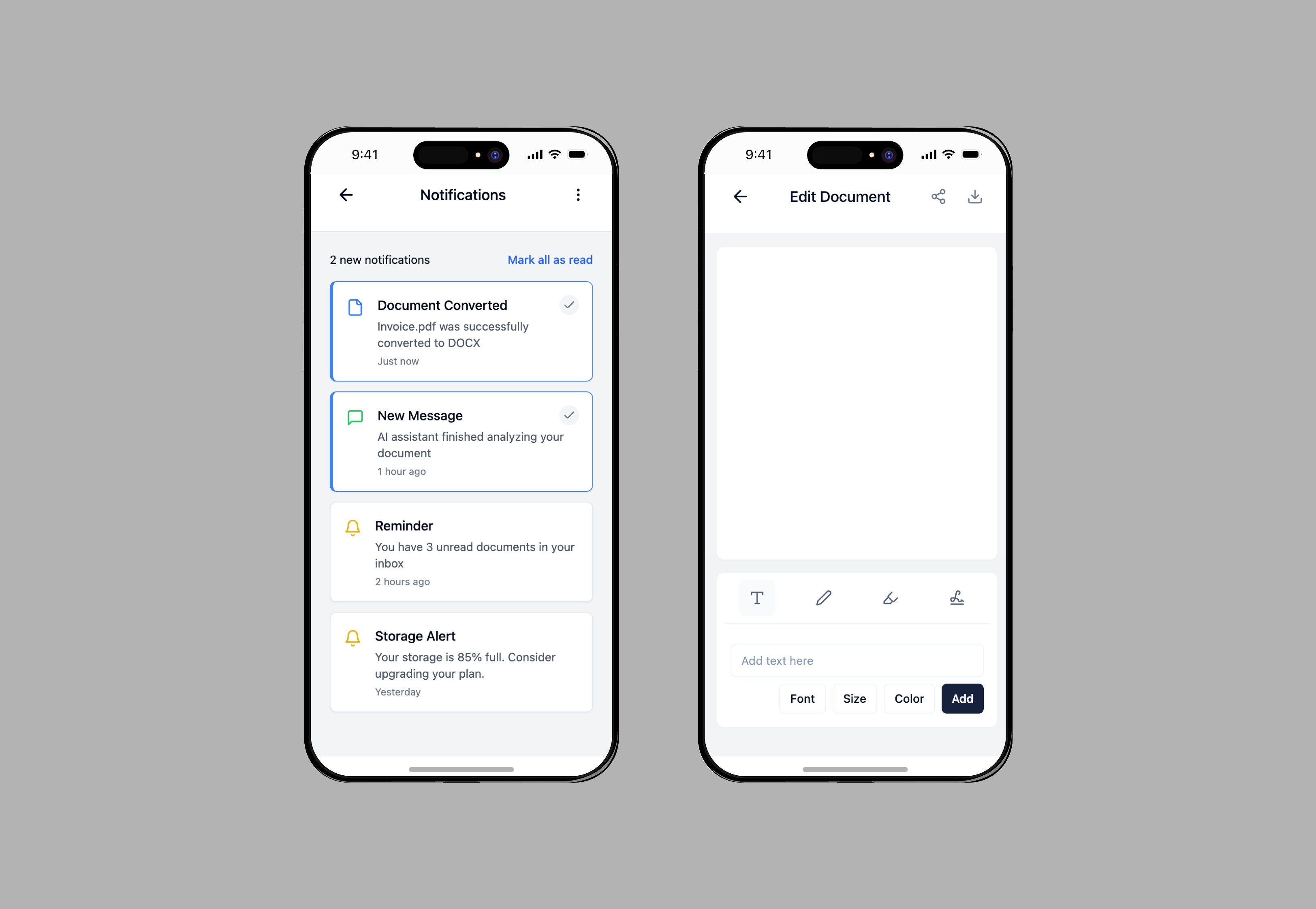
The edit screen is built for simplicity. Users can easily add text, draw, sign documents, or highlight sections using a focused toolbar. The interface stays clean, with tools only surfacing when needed to avoid overwhelming the user.
Notifications follow the same clean logic. Delivered in soft card-style alerts, system messages appear subtly without disrupting the workflow. Status icons, timestamps, and color accents help prioritize attention. This consistent card-based design language reinforces the calm tone of the product.
The edit screen is built for simplicity. Users can easily add text, draw, sign documents, or highlight sections using a focused toolbar. The interface stays clean, with tools only surfacing when needed to avoid overwhelming the user.
Notifications follow the same clean logic. Delivered in soft card-style alerts, system messages appear subtly without disrupting the workflow. Status icons, timestamps, and color accents help prioritize attention. This consistent card-based design language reinforces the calm tone of the product.
The edit screen is built for simplicity. Users can easily add text, draw, sign documents, or highlight sections using a focused toolbar. The interface stays clean, with tools only surfacing when needed to avoid overwhelming the user.
Notifications follow the same clean logic. Delivered in soft card-style alerts, system messages appear subtly without disrupting the workflow. Status icons, timestamps, and color accents help prioritize attention. This consistent card-based design language reinforces the calm tone of the product.
File History – Recent Documents at a Glance
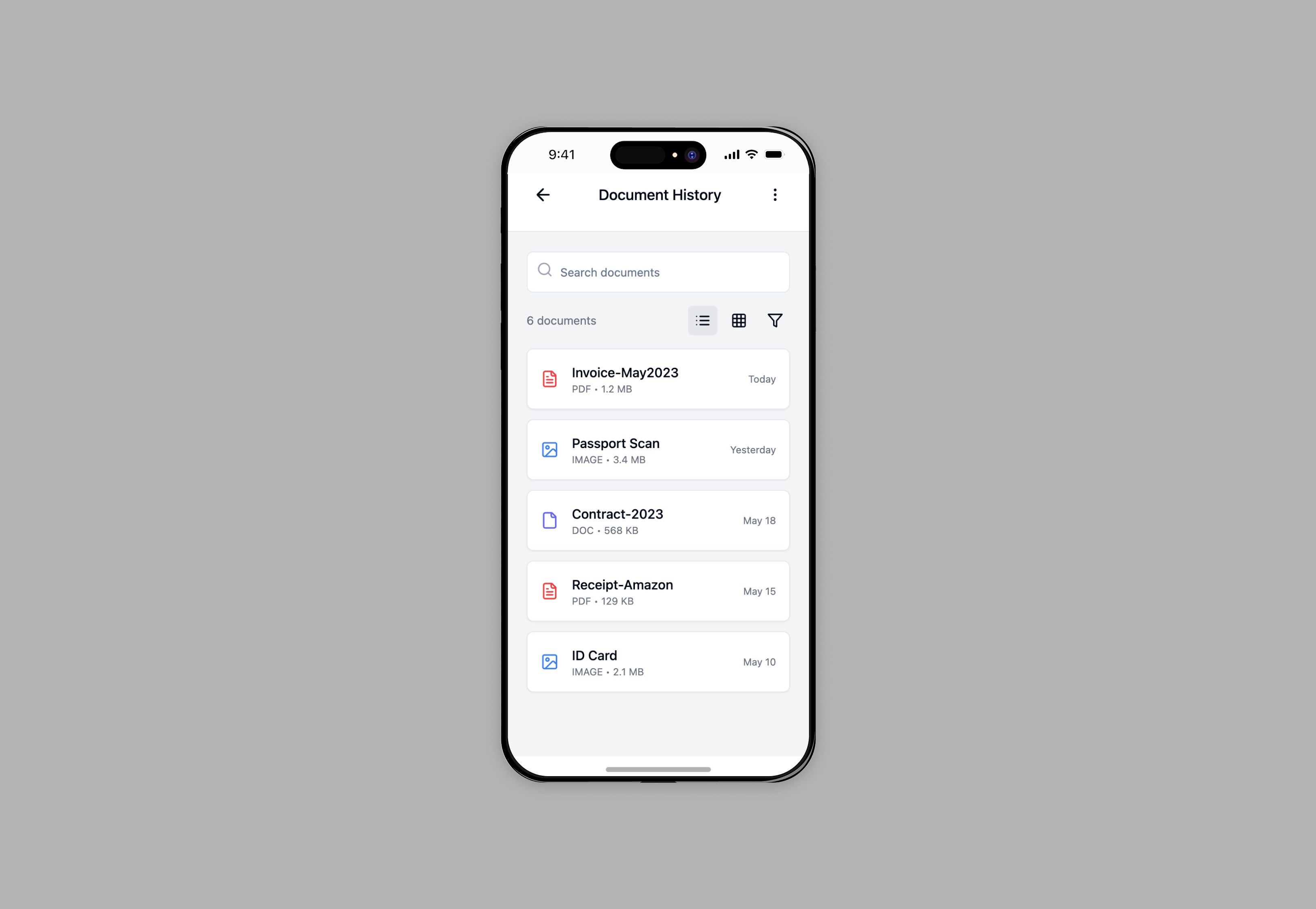
The document history screen provides an organized archive of the user’s recent activity. Each file is displayed as a thumbnail card with metadata like file type, date modified, and file name. The grid layout with soft spacing ensures that users can scan and locate documents quickly. Small icons indicate actions like re-open, share, or delete, keeping functionality close without clutter.
The document history screen provides an organized archive of the user’s recent activity. Each file is displayed as a thumbnail card with metadata like file type, date modified, and file name. The grid layout with soft spacing ensures that users can scan and locate documents quickly. Small icons indicate actions like re-open, share, or delete, keeping functionality close without clutter.
The document history screen provides an organized archive of the user’s recent activity. Each file is displayed as a thumbnail card with metadata like file type, date modified, and file name. The grid layout with soft spacing ensures that users can scan and locate documents quickly. Small icons indicate actions like re-open, share, or delete, keeping functionality close without clutter.
Outcome
Outcome
The final prototype showcases a modern, scalable mobile interface that could be built into a real-world product. It balances utility and aesthetic simplicity, making complex actions feel intuitive. The interface supports consistent interactions while giving each workflow enough breathing space.
The final prototype showcases a modern, scalable mobile interface that could be built into a real-world product. It balances utility and aesthetic simplicity, making complex actions feel intuitive. The interface supports consistent interactions while giving each workflow enough breathing space.
The final prototype showcases a modern, scalable mobile interface that could be built into a real-world product. It balances utility and aesthetic simplicity, making complex actions feel intuitive. The interface supports consistent interactions while giving each workflow enough breathing space.
Next steps
Future iterations could explore user testing with interactive prototypes, dark mode support, cloud integrations (e.g., Google Drive, Dropbox), and extending the AI assistant’s capabilities to provide real-time document summaries, OCR, and smart file recommendations.
Future iterations could explore user testing with interactive prototypes, dark mode support, cloud integrations (e.g., Google Drive, Dropbox), and extending the AI assistant’s capabilities to provide real-time document summaries, OCR, and smart file recommendations.
Future iterations could explore user testing with interactive prototypes, dark mode support, cloud integrations (e.g., Google Drive, Dropbox), and extending the AI assistant’s capabilities to provide real-time document summaries, OCR, and smart file recommendations.