03
SaaS Dashboard
A modern, soft-styled analytics dashboard designed for a SaaS platform to help users track revenue, traffic, campaign performance, and audience insights in one clean, breathable interface.
A modern, soft-styled analytics dashboard designed for a SaaS platform to help users track revenue, traffic, campaign performance, and audience insights in one clean, breathable interface.
A modern, soft-styled analytics dashboard designed for a SaaS platform to help users track revenue, traffic, campaign performance, and audience insights in one clean, breathable interface.
Role
Role
Role
UX/UI Designer
UX/UI Designer
UX/UI Designer
Timeline
Timeline
Timeline
6 weeks
6 weeks
6 weeks
Team
Team
Team
1 designer, 1 product manager, 1 developers
1 designer, 1 product manager, 1 developers
1 designer, 1 product manager, 1 developers
Overview
Overview
This project explores the redesign of a web analytics and campaign tracking platform tailored for marketers and product teams. The goal was to create a dashboard UI that feels lightweight, structured, and data-rich without being visually overwhelming. The interface includes intuitive navigation, modular stat cards, and minimalist charts that emphasize clarity and usability.
This project explores the redesign of a web analytics and campaign tracking platform tailored for marketers and product teams. The goal was to create a dashboard UI that feels lightweight, structured, and data-rich without being visually overwhelming. The interface includes intuitive navigation, modular stat cards, and minimalist charts that emphasize clarity and usability.
This project explores the redesign of a web analytics and campaign tracking platform tailored for marketers and product teams. The goal was to create a dashboard UI that feels lightweight, structured, and data-rich without being visually overwhelming. The interface includes intuitive navigation, modular stat cards, and minimalist charts that emphasize clarity and usability.
About the company
About the company
Datra is a growing SaaS platform that provides web analytics and campaign performance tracking tools for small to mid-size businesses. The product helps users monitor traffic sources, campaign ROI, and customer behavior across digital channels. Its core mission is to turn raw data into simple, actionable insights for everyday marketing teams.
Datra is a growing SaaS platform that provides web analytics and campaign performance tracking tools for small to mid-size businesses. The product helps users monitor traffic sources, campaign ROI, and customer behavior across digital channels. Its core mission is to turn raw data into simple, actionable insights for everyday marketing teams.
Datra is a growing SaaS platform that provides web analytics and campaign performance tracking tools for small to mid-size businesses. The product helps users monitor traffic sources, campaign ROI, and customer behavior across digital channels. Its core mission is to turn raw data into simple, actionable insights for everyday marketing teams.
Challenge
Challenge
The key challenge was to design a data-dense environment that doesn't feel complex or heavy. The original layout lacked hierarchy, used outdated chart styles, and failed to support a modular approach that scales with user needs. The goal was to restructure the entire experience into a system that is visually coherent, adaptable, and mobile-responsive, while keeping the interface fresh and modern.
The key challenge was to design a data-dense environment that doesn't feel complex or heavy. The original layout lacked hierarchy, used outdated chart styles, and failed to support a modular approach that scales with user needs. The goal was to restructure the entire experience into a system that is visually coherent, adaptable, and mobile-responsive, while keeping the interface fresh and modern.
The key challenge was to design a data-dense environment that doesn't feel complex or heavy. The original layout lacked hierarchy, used outdated chart styles, and failed to support a modular approach that scales with user needs. The goal was to restructure the entire experience into a system that is visually coherent, adaptable, and mobile-responsive, while keeping the interface fresh and modern.
Redesign focus
Main Dashboard – At-a-Glance Metrics
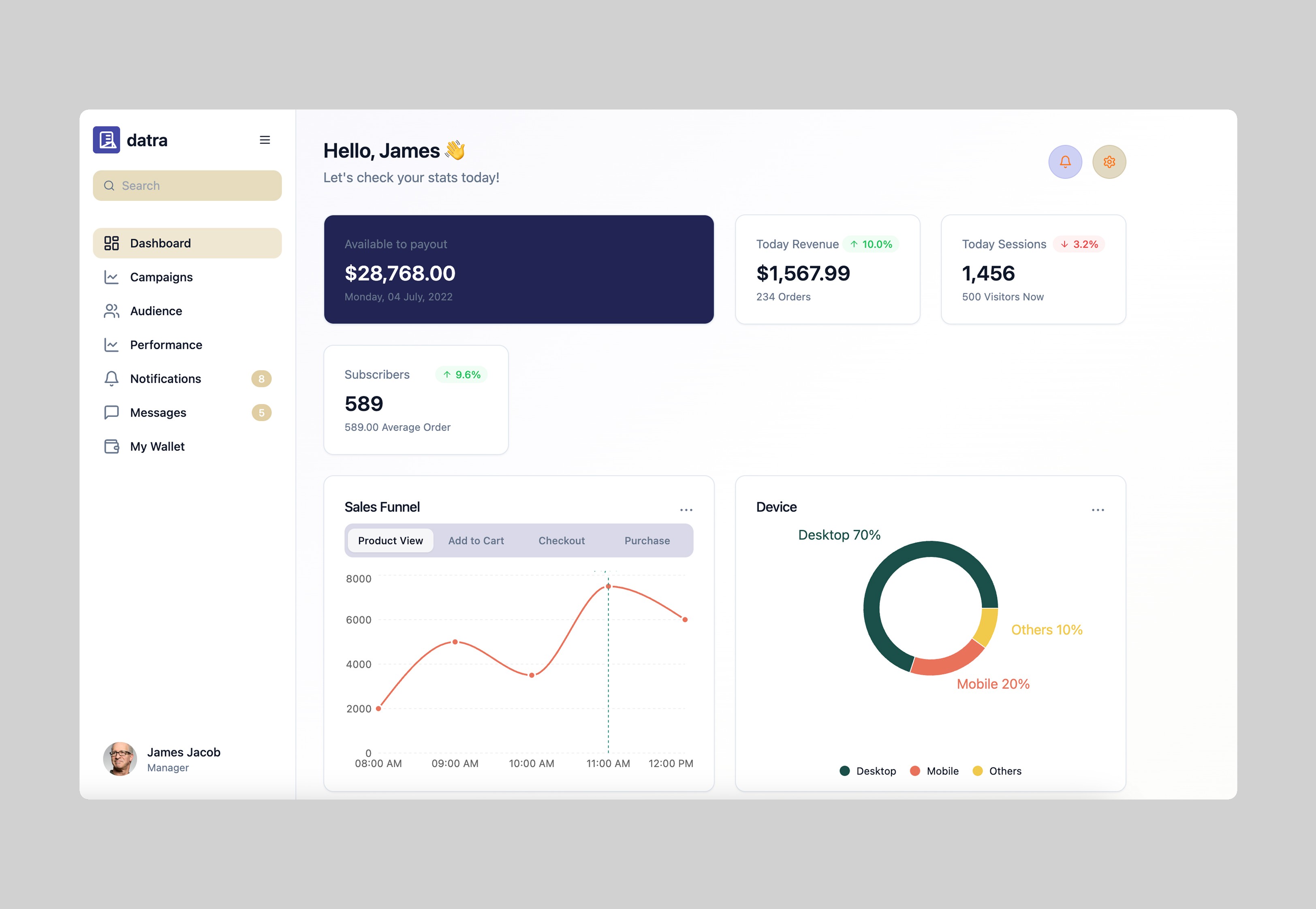
The dashboard screen brings together all key stats like today’s revenue, traffic, sessions, and subscriber counts. Each metric is placed in a card with smooth shadows, color-coded highlights (green for growth, red for decline), and compact typography. The sales funnel is shown via a clean line graph with subtle tooltips, while device type distribution is visualized in a soft pie chart. Campaign and audience tables are kept minimal for quick scanning.
The dashboard screen brings together all key stats like today’s revenue, traffic, sessions, and subscriber counts. Each metric is placed in a card with smooth shadows, color-coded highlights (green for growth, red for decline), and compact typography. The sales funnel is shown via a clean line graph with subtle tooltips, while device type distribution is visualized in a soft pie chart. Campaign and audience tables are kept minimal for quick scanning.
The dashboard screen brings together all key stats like today’s revenue, traffic, sessions, and subscriber counts. Each metric is placed in a card with smooth shadows, color-coded highlights (green for growth, red for decline), and compact typography. The sales funnel is shown via a clean line graph with subtle tooltips, while device type distribution is visualized in a soft pie chart. Campaign and audience tables are kept minimal for quick scanning.
Campaign Manager & Audience Insights – Ad Spend Tracking
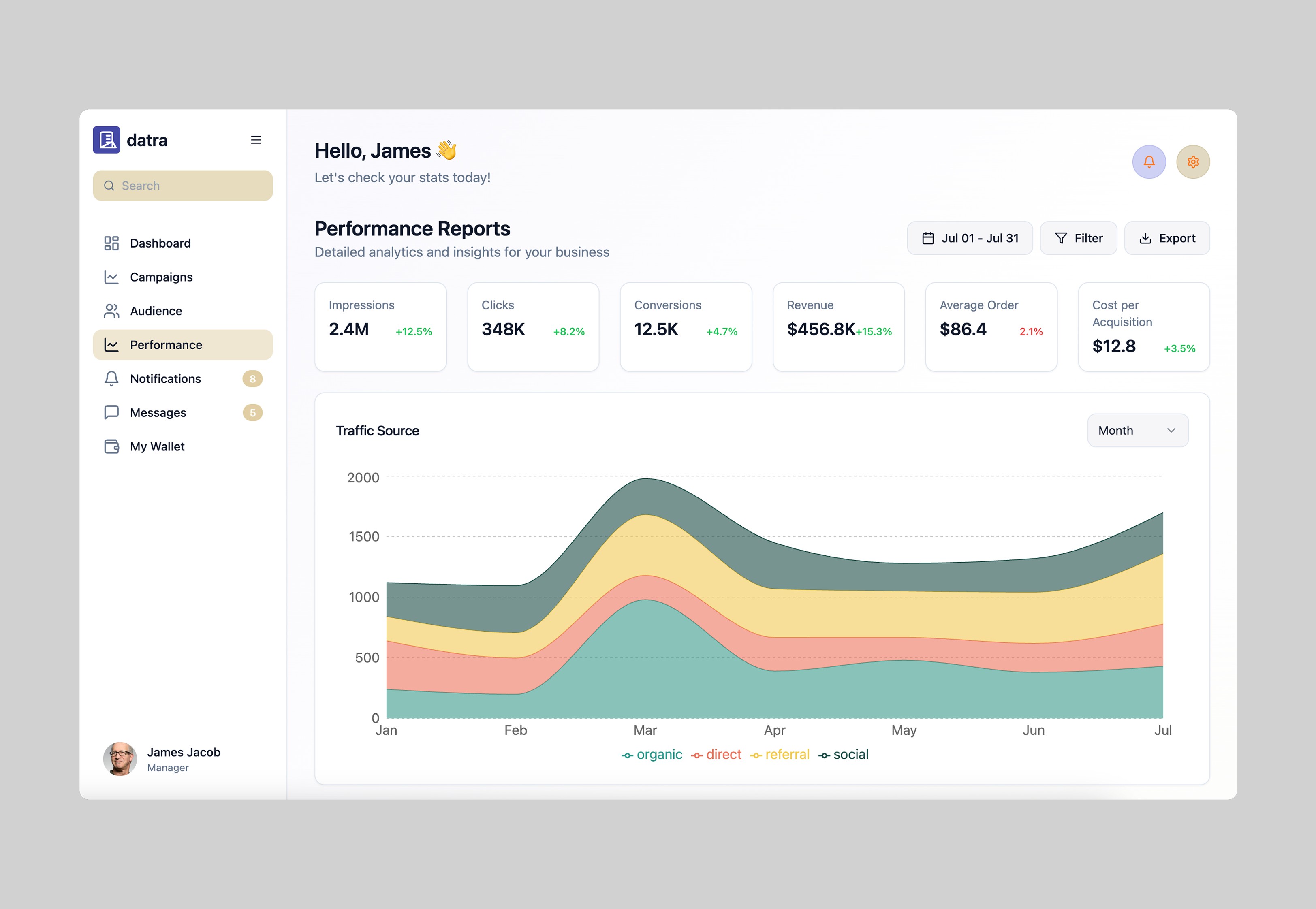
Audience insights are visualized through modular cards showing user locations, device usage, top cities, and engagement levels. Pie charts, bar graphs, and data tags help segment key demographics. Cards are spaced generously to maintain clarity even with dense information.
Audience insights are visualized through modular cards showing user locations, device usage, top cities, and engagement levels. Pie charts, bar graphs, and data tags help segment key demographics. Cards are spaced generously to maintain clarity even with dense information.
Audience insights are visualized through modular cards showing user locations, device usage, top cities, and engagement levels. Pie charts, bar graphs, and data tags help segment key demographics. Cards are spaced generously to maintain clarity even with dense information.
My Wallet – Financial Overview
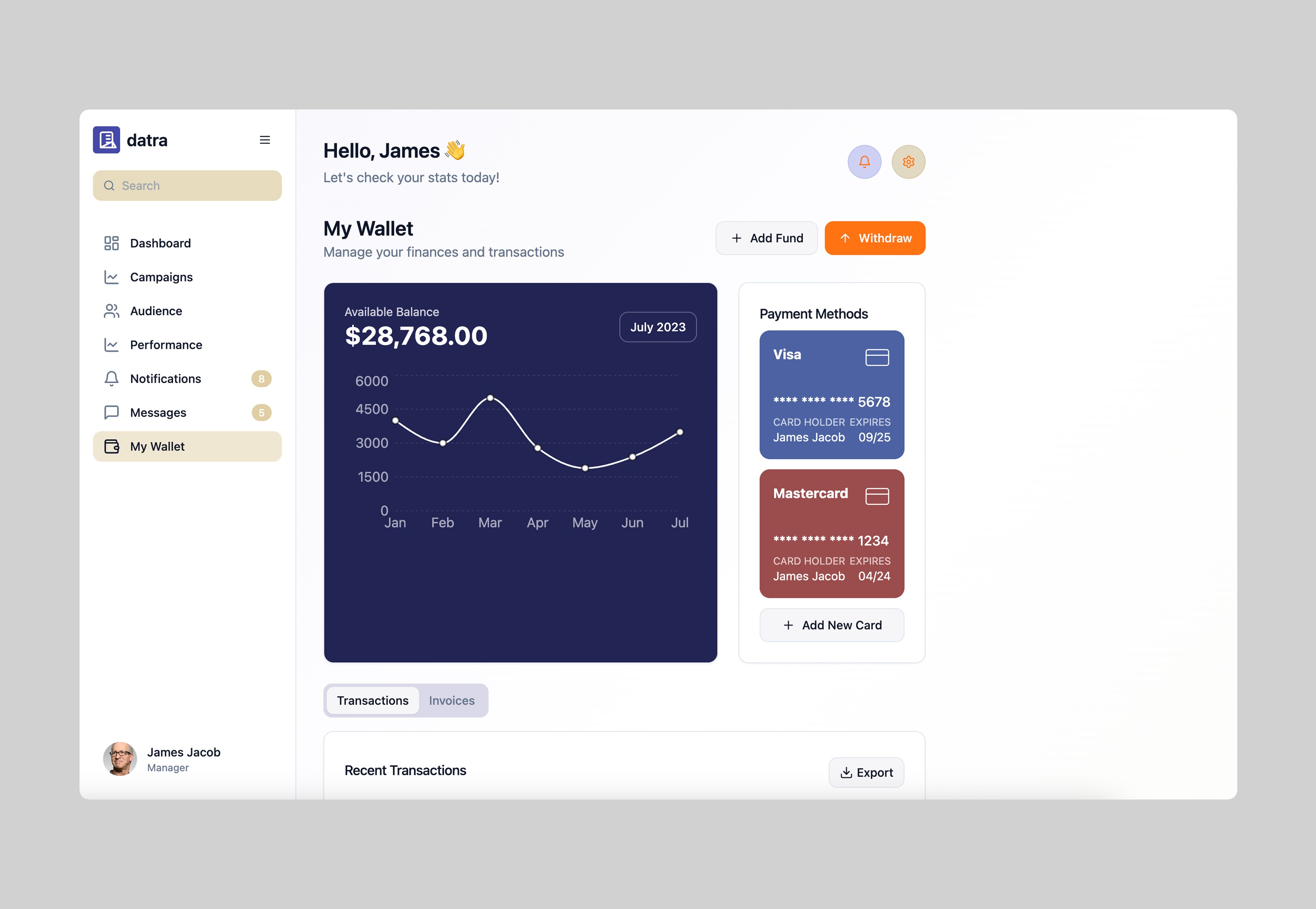
A soft, minimal billing section shows current balance, available payout, and transaction history. A simple card layout with icons helps users manage invoices, track earnings, and view past activity with ease.
A soft, minimal billing section shows current balance, available payout, and transaction history. A simple card layout with icons helps users manage invoices, track earnings, and view past activity with ease.
A soft, minimal billing section shows current balance, available payout, and transaction history. A simple card layout with icons helps users manage invoices, track earnings, and view past activity with ease.
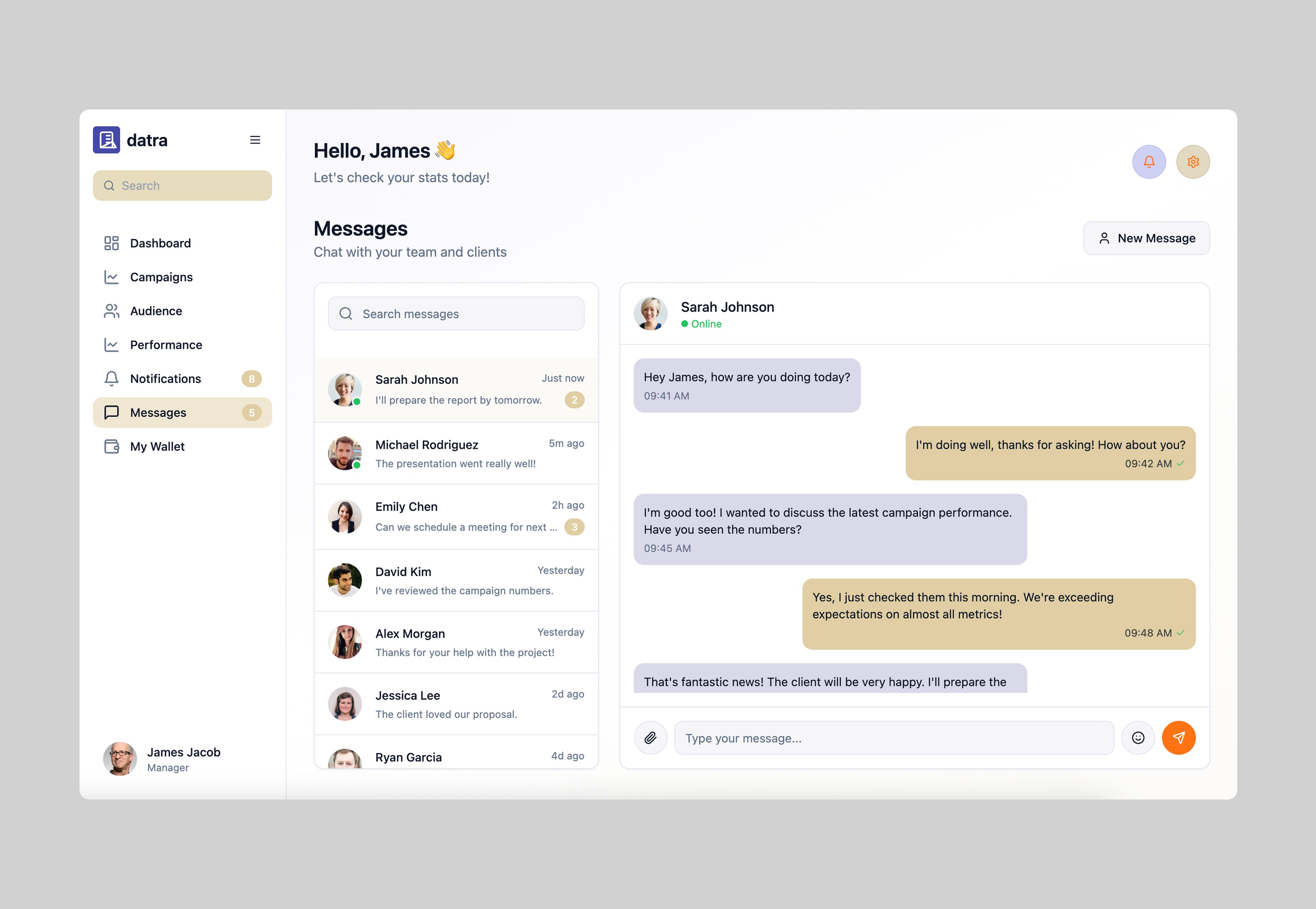
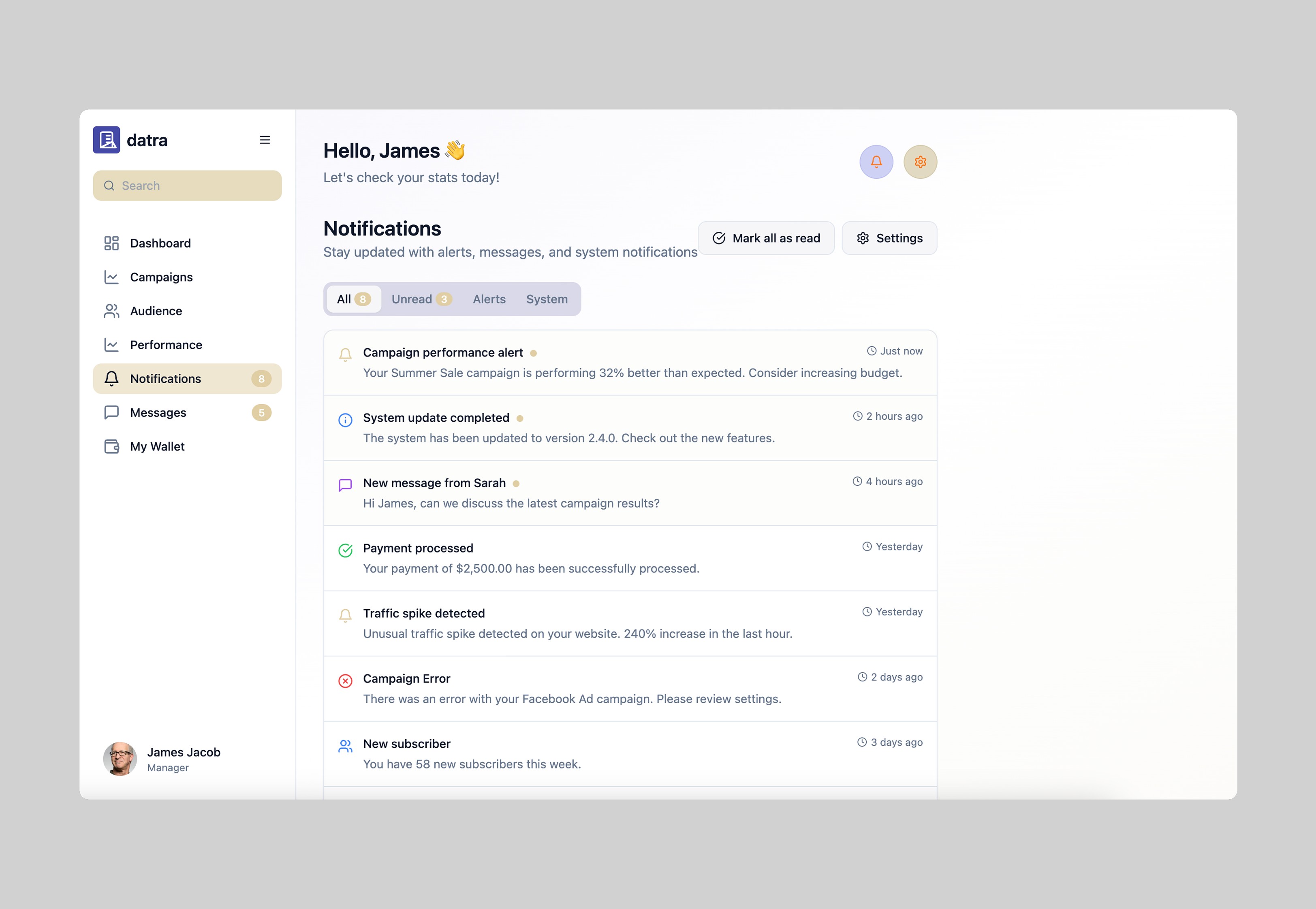
System alerts, billing reminders, and user messages live in a shared center, designed as stacked cards with timestamps, colored tags, and icons for clarity. Each alert is readable at a glance and visually consistent with the rest of the UI.
System alerts, billing reminders, and user messages live in a shared center, designed as stacked cards with timestamps, colored tags, and icons for clarity. Each alert is readable at a glance and visually consistent with the rest of the UI.
System alerts, billing reminders, and user messages live in a shared center, designed as stacked cards with timestamps, colored tags, and icons for clarity. Each alert is readable at a glance and visually consistent with the rest of the UI.
Outcome
Outcome
The redesign brought a significant improvement to how users interpret and interact with their data. Visual noise was reduced, and key actions became easier to access. The modular card system introduced visual consistency, and the improved data visualization made reporting faster and more insightful. Early feedback from test users noted improved clarity, faster task completion, and a more enjoyable experience overall.
The redesign brought a significant improvement to how users interpret and interact with their data. Visual noise was reduced, and key actions became easier to access. The modular card system introduced visual consistency, and the improved data visualization made reporting faster and more insightful. Early feedback from test users noted improved clarity, faster task completion, and a more enjoyable experience overall.
The redesign brought a significant improvement to how users interpret and interact with their data. Visual noise was reduced, and key actions became easier to access. The modular card system introduced visual consistency, and the improved data visualization made reporting faster and more insightful. Early feedback from test users noted improved clarity, faster task completion, and a more enjoyable experience overall.
Next steps
We plan to further enhance Datra by adding real-time collaboration tools, deeper integration with ad platforms, and expanded customization for dashboards. Mobile responsiveness and dark mode support are also in progress to meet user expectations for accessibility and flexibility.
We plan to further enhance Datra by adding real-time collaboration tools, deeper integration with ad platforms, and expanded customization for dashboards. Mobile responsiveness and dark mode support are also in progress to meet user expectations for accessibility and flexibility.
We plan to further enhance Datra by adding real-time collaboration tools, deeper integration with ad platforms, and expanded customization for dashboards. Mobile responsiveness and dark mode support are also in progress to meet user expectations for accessibility and flexibility.